
Workflows
Chain agents and steps together, start them from events, and decide what happens when someone replies.
A workflow is a series of steps that runs when something happens, such as a new email, a form, a call or a time of day. Each step is an agent or a check.
Falcon shows each workflow as one sentence you can read, and as steps you can open and change.
Like agents, workflows have drafts and a Live version. You can try a workflow before it runs for real.
Workflows and how they work
In pilotSee the company's workflows, and read a short guide to how a workflow runs.
What you can do
- Browse workflows and their state
- Read How workflows work
- Describe a new workflow in your own words and let Falcon draft it
Edit a workflow
In pilotAdd, move and remove steps on a canvas, with the chosen step's settings beside it.
What you can do
- Add an agent step and choose its tools
- Reorder or remove steps
- Try the workflow before it is Live
How a workflow starts
In pilotStart a workflow on a schedule, when an app sends an event, when a conversation arrives, or when another system calls it.
What you can do
- Pick a start from connected apps first
- Set the start's details inline, with examples
- See an example of the event that starts it
Side chains and retries
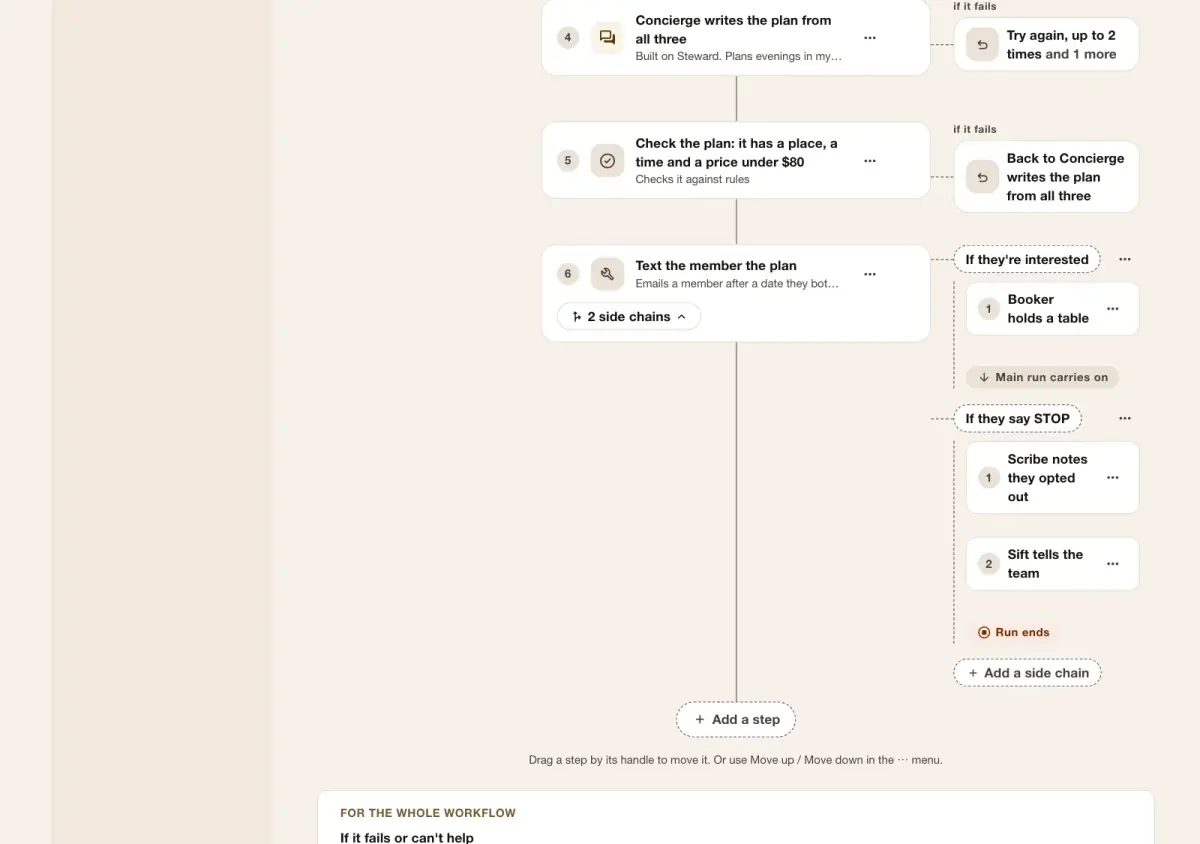
In pilotHang extra steps off a step for when someone is interested, replies STOP, or the step fails.
What you can do
- Add a side chain to any step
- Retry a failed step, or run a side chain instead
Hours check
In pilotA step that checks whether a person or place is open now, and sends the workflow one way or the other.
What you can do
- Check an identity's working hours
- Send out-of-hours work down its own path
Front desk
In pilotA first step that greets the person, looks them up in past conversations, and hands them to the right agent, such as sales or service.
What you can do
- Name the routes and what each is for
- Match the person to past conversations first
- Send each route to its own agent
Engagements
In pilotSay what counts as someone engaging, such as replying or booking, so each can start a side chain.
What you can do
- Define what the company counts as engaging
- Use an engagement to start a side chain
Waiting for you
In pilotDrafts that need a person before they are sent, from every workflow, in one place.
What you can do
- Send a draft as it is
- Edit a draft, then send it
- Decide not to send it
Request mapping
In pilotGive any outside system its own address to call, and map what it sends into a workflow or an agent.
What you can do
- Create an address for each system and rotate it when needed
- Map fields from the request into the workflow
- Start from ready-made settings for Twilio, Zoom or RingCentral recordings
- Check Stripe, Shopify, GitHub and Slack requests against the signature each one sends
- Check signatures or a shared key before anything runs
- Map each value from a body field, query parameter, header or fixed value into a start, identity or customer field, or an outgoing header
- See what the target receives, the steps that get it first, and what your system gets back
- Flag maps for a look when a published workflow changes its start fields or result
Runs
In pilotSee each time a workflow ran, and step in when one needs it.
What you can do
- Retry, cancel or reschedule a run
- Run a scheduled run now
Publish and roll back
In pilotMake a workflow Live, go back to an earlier version, or archive it.
What you can do
- Make a version Live
- Roll back to the previous version
- Archive a workflow you no longer use
Webhooks out
In pilotTell your own systems when a workflow does something, by sending them a signed message.
What you can do
- Add an address to notify
- Choose which events it receives
When a reply could be for more than one
In pilotIf two agents or identities wrote to someone and they reply, choose whether the reply goes to the latest, to both, or is read to decide.
What you can do
- Set the rule for each channel
- Override it on a workflow step
Taking turns
In pilotShare new conversations between identities in turn, such as sales reps who are available, and keep returning people with the same one.
What you can do
- Rotate new leads between identities in turn, to the least busy, or by weight
- Only give turns to identities that are active, inside their working hours and free on their calendar
- Set a daily limit per identity, and choose who answers or wait when nobody is available
- Keep a returning customer with their rep on any channel, and switch them when the rep leaves
- Move a person to someone else by hand
- See conversations per identity and why each one got them
Acting as on a step
In pilotPick which identity an agent acts as on each step, so the same agent can appear three times as three people.
What you can do
- Choose an identity for each agent step, or leave it to the workflow
- Let a step take turns among identities, keeping returning people with the same one
- Use the step's identity for its tools, what it remembers and the messages it sends
- Commit to GitHub as the identity, with the requester credited
Topics and keywords on messages
Coming nextLabel outgoing messages with a topic, so opting out of marketing never stops order updates, and route replies by keyword.
What you can do
- Keep a list of topics for the company
- Let people opt out of one topic only
- Route a reply by keyword
Evaluate steps
Coming nextA step that scores or checks the work of earlier steps, and workflows that only evaluate.
What you can do
- Check a plan is complete before it is sent
- Run an evaluation on its own
Sequences that repeat
Coming nextRepeat a set of steps, such as a follow-up every few days, until someone replies or a limit is reached.
What you can do
- Repeat steps on a schedule
- Stop when the person replies
Nudges and review rounds
Coming nextRemind people who haven't answered, and pass work through more than one review before it goes out.
What you can do
- Send a reminder after a set time
- Add review rounds
Who can do what
Who may do each thing in this guide, and what an AI assistant connected as that person may do with it. Roles are set in Company settings › Roles.
| What | Who may | An assistant |
|---|---|---|
| Lists the company's workflows | Anyone who can see it | Reads · needs “look” |
| Get workflow version | Anyone who can see it | Reads · needs “look” |
| Test workflow | People who can edit it | Reaches outside · needs “run and test” · waits for your approval |
| Update step tool settings | People who can edit it | Changes · needs “change settings” · waits for your approval |
| Read workflow step tool settings | Anyone who can see it | Reads · needs “look” |
| Lists what starts a workflow | Anyone who can see it | Reads · needs “look” |
| Adds something that starts a workflow | People who can edit it | Reaches outside · needs “change settings” · waits for your approval |
| Get workflow event example | Anyone who can see it | Reads · needs “look” |
| Adopt a Gmail reply draft agent | People who can edit it | Changes · needs “change settings” · waits for your approval |
| Install the Gmail reply draft workflow | People who can edit it | Changes · needs “change settings” · waits for your approval |
| List incoming request maps | Anyone who can see it | Reads · needs “look” |
| List what request map targets receive and give back | Anyone who can see it | Reads · needs “look” |
| Create an incoming request map | People who can edit it | Changes · needs “change settings” · waits for your approval |
| Update an incoming request map | People who can edit it | Changes · needs “change settings” · waits for your approval |
| Rotate an incoming request address | People who can rotate secrets | Changes · needs “change settings” · waits for your approval |
| Receive a mapped incoming request | The configured sender verification; no Studio session is accepted. | Not offered to assistants |
| Retry workflow run | People who can edit it | Reaches outside · needs “run and test” · waits for your approval |
| Cancel workflow run | People who can edit it | Cannot be undone · needs “run and test” · waits for your approval |
| Reschedule workflow run | People who can edit it | Changes · needs “run and test” · waits for your approval |
| Runnow workflow run | People who can edit it | Reaches outside · needs “run and test” · waits for your approval |
| Restores an older workflow version as the draft. To change Live, make an older version live instead | People who can make it Live | Reaches outside · needs “change settings” · waits for your approval |
| Archive a workflow | People who can edit it | Cannot be undone · needs “change settings” · waits for your approval |
| Lists a workflow's webhooks | Anyone who can see it | Reads · needs “look” |
| Adds a webhook to a workflow | People who can edit it | Reaches outside · needs “change settings” · waits for your approval |
| Changes a workflow webhook | People who can edit it | Reaches outside · needs “change settings” · waits for your approval |
| Read text shared-sender reply settings | Anyone who can see it | Reads · needs “look” |
| Set text shared-sender reply settings | People who manage tools | Changes · needs “change settings” |
| Report on taking turns | Anyone who can see it | Reads · needs “look” |
| Find who a person is with | People who can edit it | Reads · needs “look” |
| Move a person to another identity | People who can edit it | Changes · needs “change settings” · waits for your approval |
| Read company message topics | Company administrators | Reads · needs “look” |
| Update company message topics | Company administrators | Changes · needs “change settings” · waits for your approval |