
Identities
The people and places your agents speak as, each with its own details, hours and ways to be reached.
An identity is a person or a place that an agent acts for, such as Dana in sales or the Downtown store. One agent can speak as many identities.
Identities are not Falcon users. They never sign in. They are records the company keeps, with the details an agent needs to speak as them.
The company decides which details every identity has, such as a name, a communication style or a background. An agent is told those details when it writes as that identity.
Company identities
In pilotKeep the company's people and places in one list, each with its own page and a short code you can use to refer to it.
What you can do
- Add a person or a place
- Give each identity a code that stays stable if you rename it
- Explain on the page how identities differ from users
Your own identities
In pilotKeep identities of your own, for agents you build for yourself.
What you can do
- Add and edit identities only you use
Identity fields
In pilotDecide once which details every identity has. Name, company, communication style, background and voice are built in; you can hide them or add your own.
What you can do
- Add a field and say what the agent is told about it
- Hide a built-in field you don't need
- Mark a field required
Checks on identity details
In pilotFalcon checks what is typed into an identity's fields, such as whether a name looks like a name, before it is saved.
What you can do
- Choose which fields are checked
- See why a value was refused or flagged
Working hours
In pilotGive a person or place its hours, so workflows know when it is open.
What you can do
- Set opening or working hours for each day
- Use the hours in a workflow's hours check
Where an identity can be reached
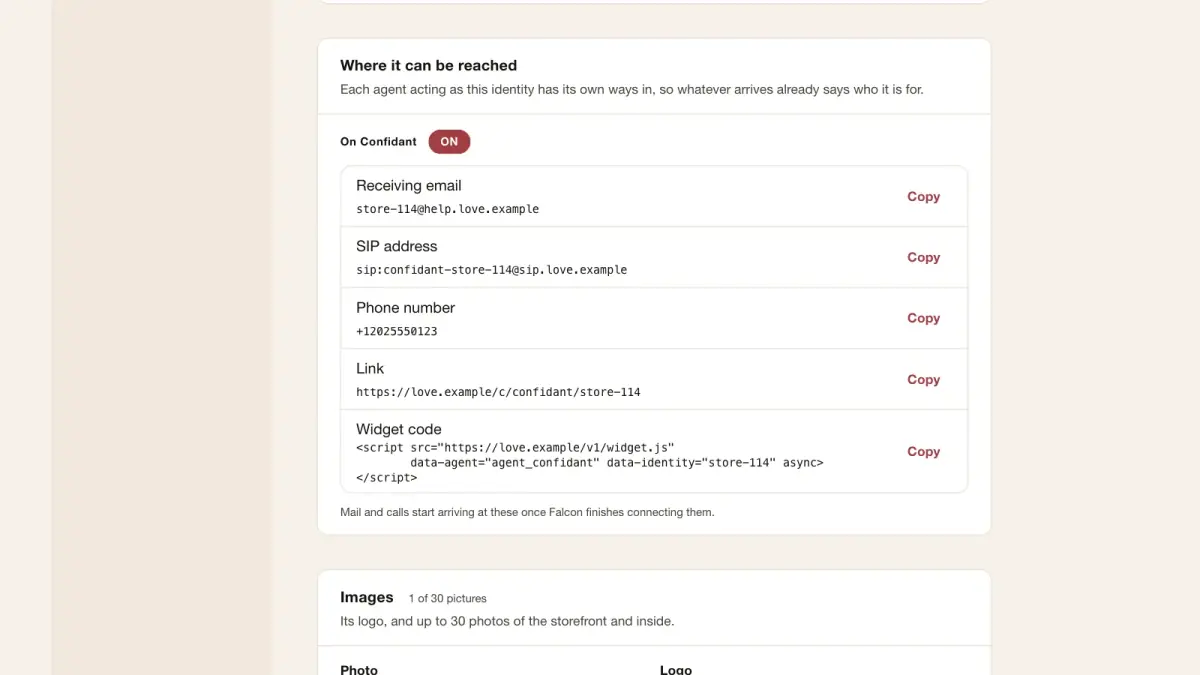
In pilotEach identity an agent acts as can have its own email address, phone number, voice address, link and website chat widget.
What you can do
- See each address and copy the widget code
- Send a test to check an address works
RCS for each identity
In pilotMessages can come from the company's shared RCS sender, or an identity can have its own.
What you can do
- Choose the shared sender or an identity's own
- Preview the registration details before applying
An identity's own mailbox and calendar
In pilotConnect an identity's own mailbox and calendar, so an agent can send as them and check when they are free.
What you can do
- Connect a Gmail mailbox for an identity
- Connect a calendar and choose what the agent may see
Images of an identity
In pilotAdd photos of a person or place, with a note on when an agent should use each one.
What you can do
- Upload images with captions
- Say when each image should be used
Import identities
In pilotBring in many identities at once from a file. Falcon shows every row before anything is saved.
What you can do
- Upload a CSV or JSON file
- Match its columns to identity fields, or ignore a column
- Preview every row, then get a receipt
How the company's email looks
In pilotSet the layout and logo placement for email your agents send, once for the whole company.
What you can do
- Choose a layout and where the logo goes
- Preview an email before it is sent
Outlook mailboxes and calendars
Coming nextConnect an identity's Outlook mailbox and Microsoft calendar, as with Gmail.
What you can do
- Send as an identity from Outlook
- Check a Microsoft calendar for free time
A customer's contact points
Coming nextSee every way a customer has reached you, which agent and identity answered, and when.
What you can do
- See a person's numbers and addresses in one place
- See which conversation each belongs to
Pictures drawn in an identity's likeness
Coming nextLet an agent draw a picture of an identity from its reference images, labelled as made by AI.
What you can do
- Choose a primary image and style note
- Label every drawn image as made by AI
Who can do what
Who may do each thing in this guide, and what an AI assistant connected as that person may do with it. Roles are set in Company settings › Roles.
| What | Who may | An assistant |
|---|---|---|
| Read company validation checks | Company administrators | Reads · needs “look” |
| Try a validation check | Company administrators | Changes · needs “change settings” · waits for your approval |
| Request a company binding address test | Company administrators | Changes · needs “run and test” · waits for your approval |
| Read a company binding address test | Company administrators | Reads · needs “look” |
| Request a personal binding address test | People who can edit it | Changes · needs “run and test” · waits for your approval |
| Read a personal binding address test | Anyone who can see it | Reads · needs “look” |
| Read an identity binding's RCS sender | Company administrators | Reads · needs “look” |
| Choose an identity binding's RCS sender | Company administrators | Changes · needs “change settings” · waits for your approval |
| Preview an identity RCS registration | Company administrators | Changes · needs “change settings” |
| Read company binding calendar status | Company administrators | Reads · needs “look” |
| Choose company binding calendars | Company administrators | Changes · needs “change settings” |
| Read personal binding calendar status | Anyone who can see it | Reads · needs “look” |
| Choose personal binding calendars | People who can edit it | Changes · needs “change settings” |
| Preview a company identity import | Company administrators | Changes · needs “change settings” |
| Commit a company identity import | Company administrators | Changes · needs “change settings” · waits for your approval |