
Connections
Connect the apps, mailboxes, numbers and storage your agents and workflows use.
A connection is how Falcon reaches something outside it: an app such as a CRM, a mailbox, a phone provider or a storage bucket.
You connect a service once for the company. Then you choose which tools agents may use and which events can start workflows.
Some connections belong to one person, such as your own mailbox. Those appear under Your connections, and only you can use them.
Other systems can also call Falcon. See request mapping in the Workflows guide.
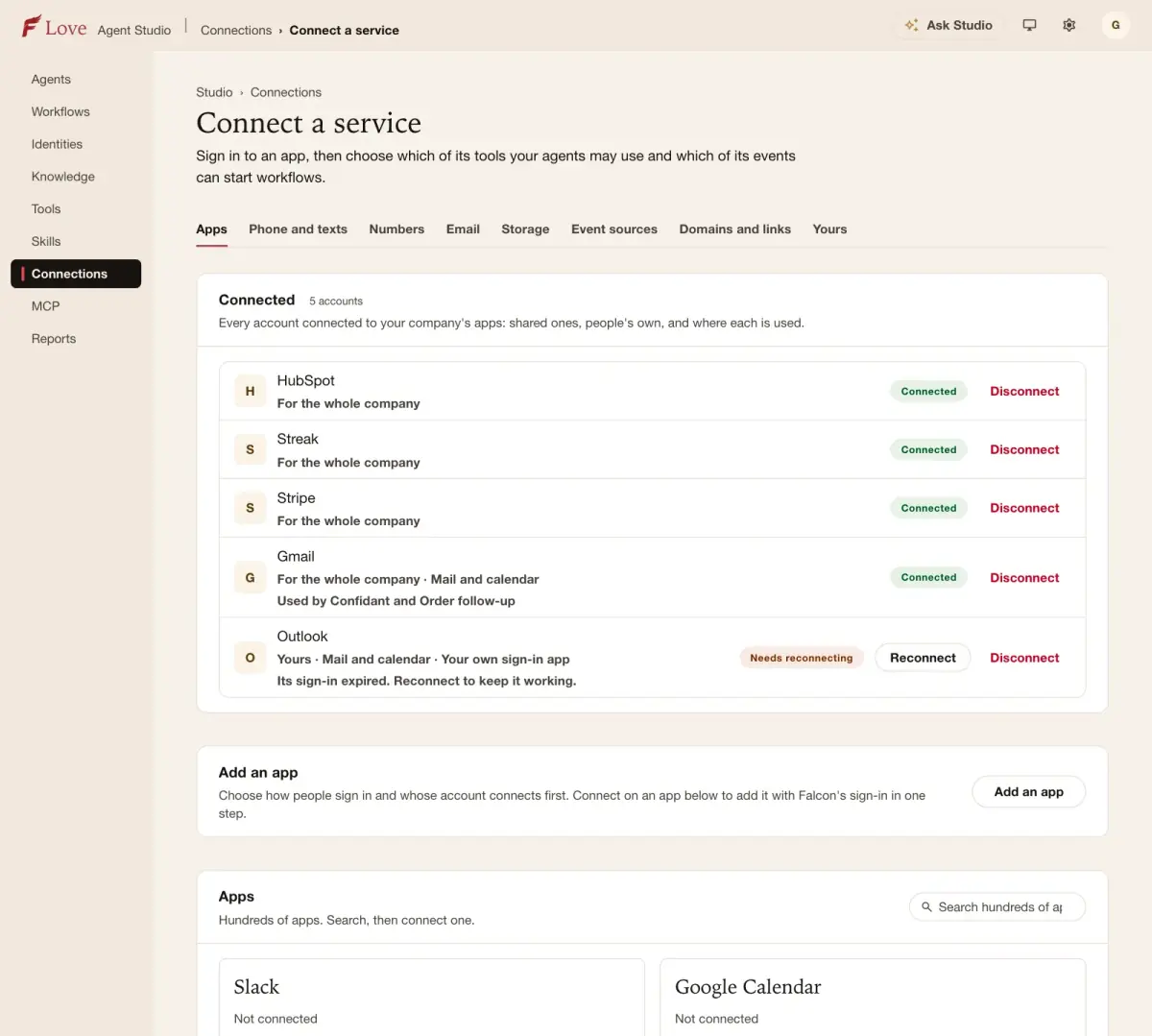
App connections
In pilotConnect business apps such as a CRM, payments or email with a browser sign-in, using Falcon's sign-in or your own.
What you can do
- Add an app and sign in to it
- Choose which of its tools agents may use
- Choose which of its events can start workflows
Your connections
In pilotConnections that belong to you, such as your own mailbox, and what may use them.
What you can do
- See the apps connected in your name
- Disconnect any of them
Email sending
In pilotSend your agents' email from your own domain, through SendGrid, or through any mailbox that offers SMTP and IMAP.
What you can do
- Connect SendGrid and send a test
- Connect another mailbox by SMTP, with IMAP to read replies
- See whether each sender is ready
Twilio
In pilotConnect your Twilio account to send and receive texts with your own numbers.
What you can do
- Connect a Twilio account and check it works
- See the senders it offers
Phone numbers and AI voicemail
In pilotGive an identity its own phone number for incoming calls, and let calls outside hours go to an AI voicemail that takes a message.
What you can do
- Link a number to an identity
- Set a number to answer as an AI voicemail
- Detach or release a number
Storage and files
In pilotConnect an Amazon S3 bucket so agents can save, read and list files, and share files by link.
What you can do
- Connect a bucket and check access
- Create file stores with their own rules
- Let agents save and read files
Event sources
In pilotLet a system send events to Falcon, so a workflow can start when something happens there.
What you can do
- Add an event source and get its address
- See an example event
Domains and links
In pilotSet which domains the company's links and addresses use.
What you can do
- See and set the company's domains
GitHub repositories
In pilotInstall the GitHub app for your organisation and choose which repositories agents may work in.
What you can do
- Install on a GitHub organisation
- Pick repositories for agents to use
Your own REST API
Coming nextDescribe your own REST API once and turn its endpoints into tools.
What you can do
- Import an API description
- Choose which endpoints become tools
Message keys
Coming nextKeys that let your own systems send messages through your agents' channels.
What you can do
- Create a key and limit what it may send
Who can do what
Who may do each thing in this guide, and what an AI assistant connected as that person may do with it. Roles are set in Company settings › Roles.
| What | Who may | An assistant |
|---|---|---|
| List connection presets | Anyone who can see it | Reads · needs “look” |
| Read a connection preset | Anyone who can see it | Reads · needs “look” |
| Connect connector preset | People who can edit it | Reaches outside · needs “change settings” · waits for your approval |
| Select connector tools | People who manage tools | Changes · needs “change settings” · waits for your approval |
| List connected apps | Anyone who can see it | Reads · needs “look” |
| Read company app sign-in settings | Anyone who can see it | Reads · needs “look” |
| Change company app sign-in settings | People who can edit it | Changes · needs “change settings” · waits for your approval |
| List connected apps | Anyone who can see it | Reads · needs “look” |
| Disconnect connected app | People who can edit it | Cannot be undone · needs “change settings” · waits for your approval |
| Create send grid connection | People who can edit it | Changes · needs “change settings” · waits for your approval |
| Test send grid connection | People who can edit it | Reaches outside · needs “run and test” · waits for your approval |
| List SendGrid connections | Anyone who can see it | Reads · needs “look” |
| Connect an Other email mailbox | People who can edit it | Reaches outside · needs “change settings” · waits for your approval |
| Read saved Other email mailboxes | Anyone who can see it | Reads · needs “look” |
| Disconnect an Other email mailbox | People who can delete it | Changes · needs “change settings” · waits for your approval |
| List available message senders | Anyone who can see it | Reads · needs “look” |
| Create twilio connection | People who can edit it | Changes · needs “change settings” · waits for your approval |
| Put twilio connection | People who can edit it | Changes · needs “change settings” · waits for your approval |
| Check twilio connection | People who can edit it | Reaches outside · needs “change settings” · waits for your approval |
| List twilio connections | Anyone who can see it | Reads · needs “look” |
| Adds a storage connection | Company administrators | Changes · needs “change settings” · waits for your approval |
| Checks that a storage connection works | Company administrators | Reaches outside · needs “change settings” · waits for your approval |
| Creates a file store | Company administrators | Changes · needs “change settings” · waits for your approval |
| Changes a file store | Company administrators | Changes · needs “change settings” · waits for your approval |
| Creates a link to a stored file | Company administrators | Changes · needs “change settings” · waits for your approval |
| Read the company webhook endpoint | Anyone who can see it | Reads · needs “look” |
| Update company webhook endpoint | People who can edit it | Changes · needs “change settings” · waits for your approval |
| Read an app event example | Anyone who can see it | Reads · needs “look” |
| Read email domain policy | Company administrators | Reads · needs “look” |
| Change email domain policy | Company administrators | Changes · needs “change settings” · waits for your approval |
| Add a GitHub installation | Company administrators | Reaches outside · needs “change settings” · waits for your approval |
| Run a GitHub installation action | Company administrators | Cannot be undone · needs “change settings” · waits for your approval |